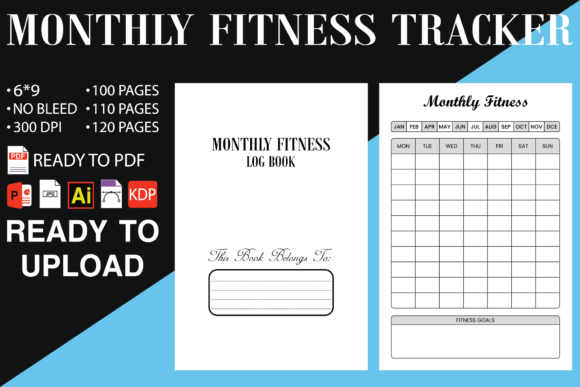
Monthly Fitness Tracker Log Book KDP
Launching a print-on-demand journal used to mean learning complex design software or hiring expensive freelancers. The Monthly Fitness Tracker Log Book KDP kit flips that assumption. It is a ready-to-publish interior template paired with editable source files, built specifically for creators who want to sell a high-quality fitness log on Amazon KDP without starting from scratch. For entrepreneurs, fitness coaches, side hustlers, and publishers — this bundle turns an idea into a live product in hours instead of weeks.
This is not just a PDF. It is a structured asset that interacts with real publishing workflows, design tools, and quality control checkpoints. Understanding how it fits into your process determines whether you simply upload a file or build a recurring revenue stream around tailored fitness stationery.
What the Kit Actually Contains
Before you can integrate it into your publishing pipeline, you need clarity on what you are getting. The Monthly Fitness Tracker Log Book KDP download includes several layers:
- Print-ready PDF with high-resolution interiors, optimized for the 6×9 trim size, and formatted without bleed. That means no trimming errors, no white edges, and a smoother KDP review process.
- Three interior page counts — 100, 110, and 120 pages. This variety lets you adjust the log’s thickness and perceived value, or split test different versions.
- Editable source files in PPTX, AI, and INDD formats. PowerPoint opens the door for non-designers. Illustrator and InDesign give professional designers full control over layers, typography, and layout.
- No-bleed design across all files. The file setup eliminates the common publishing mistake of bleed margins on interiors that don’t need them, saving time during the KDP upload.
This structure supports a clean handoff between your concept phase and the final book live on Amazon. You are not locked into a static PDF; the editable source files let you rebrand, restyle, or add client-specific details with minimal friction.
Fitting the Log Book into a KDP Publishing Workflow
Low-content publishing moves fast. A typical sequence involves market research, interior design, cover creation, file preparation, upload, and launch. The Monthly Fitness Tracker Log Book KDP shortens the interior design step from days to minutes. Here is how it plugs into a real creator’s workflow:
- Before market research finishes: You can already have a working prototype interior. While you analyze competitors and keywords, you test font readability and page layout with the PPTX file.
- During cover design: The exact 6×9 trim size of the interior lets you build a cover template that matches perfectly. No guesswork on spine width because the page count options give you precise thickness values.
- After uploading to KDP: The no-bleed PDF passes the automated review with fewer warnings. You focus on description and marketing instead of fixing formatting errors.
This is not about replacing the need for design thinking. It is about removing the repetitive technical labour that slows down a launch. Creators who release multiple journals each month can treat this kit as a baseline asset, re-skinning it for niches like yoga, running, weightlifting, or wellness coaching.
Customizing the Source Files Without Compromising Quality
Customization is the main reason the PPTX, AI, and INDD files exist. You might change the header font to match your brand, add a motivational quote page, or insert a habit tracker alongside the monthly workout logs. But working with print interiors demands caution.
In PowerPoint, the file uses standard dimensions. You can edit text boxes, swap bullet icons, or adjust table layouts for meal tracking. Export to PDF directly from PowerPoint, but always confirm that no extra margins or compression artifacts appear. A quick check in Adobe Acrobat using the print production tools prevents pixelation.
For Illustrator and InDesign, the advantage is precise control over typography, colour space (CMYK), and linking to external assets. If you sell branded fitness journals to coaching clients, you embed their logo, change divider pages, and maintain a consistent look across multiple products. The key is preserving the no-bleed safety zone. Since these source files already have interior margins defined, you simply keep text and elements inside the safe area to avoid KDP rejection.
One overlooked integration is using the PPTX file to prototype changes rapidly, then handing the AI file to a designer for final polish. This two-step process keeps costs down while still delivering a professional interior.
Quality Control and KDP Compatibility
Even with a high-quality PDF, KDP has specific requirements that catch unprepared publishers. The Monthly Fitness Tracker Log Book KDP is already aligned with many of them, but you should still run your own verification.
- Page count: The downloaded files contain 100, 110, or 120 interior pages. Choose the count based on your desired book spine width and customer expectations. Heavier logs often feel more premium but cost more to print.
- No bleed: Because the interiors have no images extending to the edge, you avoid mandatory bleed settings. This reduces the file processing load and eliminates common margin errors.
- Resolution: The original PDF meets high-resolution print standards. When you export from PowerPoint or InDesign after edits, always select “High Quality Print” or “Press Quality” presets to maintain that integrity.
- Margins: The inside gutter margin is often the problem area in POD books. The source files already include sufficient inner margins, but if you add heavy graphics near the spine, double-check KDP’s minimum requirements for your chosen page count.
A practical habit is to order a physical proof copy after uploading. Even if the digital previewer looks fine, paper texture, binding, and actual readability matter. This step is especially relevant if you modify the page layouts significantly.
From Template to Passive Income Stream
The Monthly Fitness Tracker Log Book KDP is not a final product; it is a productivity layer for your publishing business. Consider a fitness coach who wants to offer a branded training journal to her online community. She downloads the kit, replaces the default title page with her logo, adjusts the weekly summary prompts to match her coaching methodology, and exports a new PDF. Within an afternoon, she has a unique physical product that reinforces her brand and generates royalty income.
For a publisher running multiple KDP accounts or genres, this template serves as a swappable interior core. You keep a master folder with the original source files, then create variations for different sports, age groups, or goal types. Because the habit of quick iteration is built into the editable file formats, you can release a winter training log, a summer challenge edition, or a 90-day transformation journal without redesigning from zero.
Long-term, the value of this kit compounds. Once a version is live and selling, you revisit the associated source file, make seasonal updates, and republish. Your customers get a fresh edition, and your existing listing retains its ranking history. This cyclical reuse of the interior framework is what separates sporadic publishers from those building a catalogue intentionally.
How End Users Experience the Finished Tracker
While your focus as a publisher is on production and sales, understanding how the fitness tracker functions in a real person’s routine helps you make smarter design decisions. A daily fitness log must feel intuitive, not overwhelming.
The interior layout typically includes monthly goal setting, daily workout logs with space for exercises, sets, reps, and notes, plus a section for nutrition or water intake. When customizing, consider whether the prompts align with your target audience. A beginner might need more guided sections, while an experienced lifter prefers minimal structure and more blank room for journaling.
After purchase, the user interacts with the log before a workout to plan sessions, during the session to record performance, and after to review progress. Your design choices — font legibility under gym lighting, line spacing for quick handwriting, and page durability considerations — all affect that experience. A well-executed interior from the Monthly Fitness Tracker Log Book KDP not only sells better but also leads to positive reviews and repeat buyers.
Integrating with Other Tools and Platforms
The kit plays well with the broader ecosystem of self-publishing and productivity tools. Here are a few natural integrations:
- Amazon KDP cover calculator: Use the exact page count of your chosen interior file to get the correct cover template dimensions.
- Canva or Photoshop for covers: The 6×9 trim is standard, so thousands of cover templates exist. Combine this interior with a professionally designed cover to complete the book.
- BookBolt or Publisher Rocket: Research profitable fitness journal niches, then quickly tailor the interior using the PPTX file to match keywords and categories.
- Affinity Publisher: Some users prefer it over InDesign. The INDD file can be converted or rebuilt in Affinity; the structure remains the same.
By treating the Monthly Fitness Tracker Log Book KDP as a central component rather than an isolated purchase, you reduce the time spent on file setup across multiple publishing tasks. The no-bleed PDF also means you spend less time troubleshooting in KDP’s Previewer, which is a known bottleneck for new publishers.
Practical Tips for First-Time Users
If you are new to KDP or have never used editable source files before, a few small habits will prevent common frustrations:
- Start with the PowerPoint file. Even if you plan to use Illustrator later, opening the PPTX first gives you an immediate sense of the layout and what you can easily change. Save a copy, experiment, and export a low-resolution PDF to review.
- Lock the trim size in your mind. Never resize the canvas or slide dimensions; the 6×9 format is the non-negotiable foundation.
- Test on a physical sheet. Print two pages from your edited PDF on letter-sized paper, trim them to 6×9, and feel the margins. Are they balanced? Is the gutter too tight when you staple or fold? This quick prototype catches alignment errors before they reach a customer.
- Keep the original master files untouched. Store the downloaded kit in a master folder. Each new project duplicated from that master ensures you never overwrite the clean version.
- Combine interior files strategically. If you want a 105-page version, you can add a few extra note pages from the 100 or 110 source files. Pay attention to page numbering and section breaks to maintain consistency.
These habits apply whether you are publishing one book or twenty. The difference between a rushed upload and a steady stream of quality releases often comes down to respecting the file architecture you already have.
Why No Bleed Matters More Than You Think
Many low-content interiors mistakenly include bleed settings, which complicates the PDF export and sometimes triggers KDP rejection for incorrect page dimensions. The Monthly Fitness Tracker Log Book KDP is deliberately supplied without bleed. This design choice means:
- Your PDF page boxes (trim, media, art) align automatically without manual intervention.
- No need to calculate extra 0.125-inch safety zones during editing.
- Fewer formatting flags in the KDP upload interface, resulting in a faster review.
If you add full-page background colours or images that extend to the edge in a custom version, you would then need to introduce bleed for that specific element. But for the standard workout log layout, the no-bleed setup saves hours of documentation reading and trial-and-error exports.
Long-Term Value and Reusability
A template that you can use repeatedly without degrading its utility is a rare asset. Since the editable source files are yours permanently, you can develop a collection of fitness journals — from a minimalist 100-page tracker to a comprehensive 120-page wellness planner — all rooted in the same structural DNA. As your understanding of the niche deepens, you refine the template further.
Publishers who document their own customisation process build an internal style guide over time. They know which font pairs work for older readers, which weekly layout gets the best reviews, and how many lines per exercise yield high completion rates. The Monthly Fitness Tracker Log Book KDP becomes the recorded starting point of that growing knowledge base.
The real payoff appears six months or a year later, when a new fitness trend emerges and you can release a targeted log in under two days because the core interior engineering is already solved.
Organising Your Workflow Around the Template
To avoid decision fatigue and keep your publishing momentum, create a simple checklist that pairs with this kit:
- Select niche and page count.
- Open relevant source file (PPTX for rapid edits, AI/INDD for deep branding).
- Make interior modifications while keeping the original trim and margin structure intact.
- Export final PDF and verify against KDP guidelines.
- Upload, order proof, and iterate.
This standardised path transforms what could be a messy, tool-switching ordeal into a repeatable system. When life gets busy, the checklist prevents skipped steps; when motivation dips, the simplicity of the process keeps you moving forward.
The Monthly Fitness Tracker Log Book KDP is effective precisely because it does not demand that every user becomes a designer. It provides a solid, tested interior that respects Amazon’s technical requirements and gives you the flexibility to make it unmistakably yours. Whether you are launching your first KDP product or adding to an existing catalogue, integrating this kind of curated source kit into your workflow reduces wasted time and increases the professional feel of your final book.