Building a Reliable Health Routine with the Medication Tracker KDP Interior Template
Keeping track of medications, supplements, and daily health habits sounds simple on paper. In practice, it becomes one of those quiet friction points that adds cognitive load to an already busy day. Missing a dose, double-dosing by accident, or forgetting whether the evening pill was actually taken creates unnecessary stress. The Medication Tracker KDP Interior Template addresses exactly this problem by turning a recurring mental task into a structured, visual record. For anyone managing their own prescriptions, helping a family member stay on schedule, or even building a wellness-focused product line, this interior set provides a clean foundation that fits into a broader organizational system.
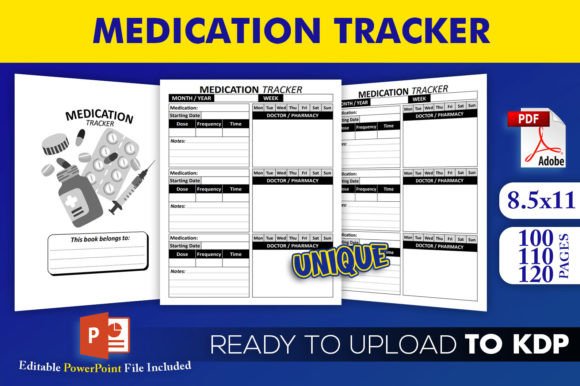
What sets this template apart from a blank notebook or a generic planner page is that it arrives purpose-built for a specific workflow. The download package includes an editable source file in PowerPoint PPTX format, along with three PDF interiors that have been tested and approved on KDP. The trim size sits at a standard 8.5×11 inches with no bleed, which simplifies both print and upload processes. Having 100, 110, and 120-page versions included means you can match the volume of the tracker to the expected duration of use without manually adjusting page counts. Every file outputs at high resolution, so the final printed product maintains clarity whether it is used at home, in a clinical setting, or sold as a published journal on Amazon.
Where a Dedicated Medication Tracker Fits into Daily and Professional Workflows
A tool like this rarely functions in isolation. It typically sits at the intersection of health management, personal productivity, and caregiving coordination. For an individual managing a short-term prescription, the tracker becomes a temporary accountability partner that lives on the kitchen counter or nightstand. For someone with a long-term condition requiring multiple daily doses, it evolves into a permanent fixture that interacts with pharmacy refill schedules, doctor appointment notes, and symptom logs.
From a publishing or product creation standpoint, the Medication Tracker KDP Interior Template occupies a different place in the workflow. It becomes an asset that reduces design time, eliminates formatting guesswork, and lets a creator focus on cover design, marketing, and niche positioning. The editable PowerPoint file allows for customization without requiring advanced software, which keeps the barrier to entry low for first-time KDP publishers or small business owners experimenting with low-content book niches. The pre-tested PDFs remove the trial-and-error phase of KDP uploads, where trim size mismatches or bleed settings can cause frustrating rejections.
Practical Implementation Before a Project or Health Cycle Begins
Preparation matters more than most people expect. Before the first entry lands on the page, several small decisions shape how effectively the tracker will serve its purpose. The Medication Tracker KDP Interior Template rewards a bit of front-end thinking because the page count options inherently ask the user or publisher to define scope.
If a creator is assembling a 90-day wellness journal aimed at post-surgery recovery, the 100-page interior likely matches the intended timeline while leaving a few pages for notes or reference material. If the goal is a half-year supplement log for fitness enthusiasts, the 120-page option provides enough runway without feeling sparse. On the personal use side, printing the 110-page version for an elderly parent’s medication schedule means there is enough space to cover roughly three months of daily tracking with room for dosage changes and doctor annotations.
During this preparation phase, pairing the editable PowerPoint file with any branding elements, instructional pages, or personalized health tips before generating the final PDF ensures that the end user receives a cohesive experience rather than a disconnected set of forms. This is where the source file’s value becomes clear, it allows the workflow to adapt to specific audiences instead of locking everyone into a one-size-fits-all format.
Using the Tracker During Active Routines and Caregiving Cycles
Once integrated into daily life, the tracker’s structure either supports consistency or quietly encourages users to abandon it. Pages that feel cluttered or overly complex tend to get skipped. The interior layout of this template keeps the focus narrow, recording what was taken and when, which reduces the friction of filling it out during a rushed morning or a tired evening.
For caregivers, the tracker often interacts with other tools and people. A printed page sitting next to a pill organizer creates a double-check system. If a home health aide visits during the day, the tracker provides an immediate answer to whether the midday dose was administered. The high-resolution interiors ensure that even photocopied pages remain legible when shared among family members or added to a medical binder. The 8.5×11 trim size with no bleed also means the pages fit standard binders and sheet protectors without trimming, which is a small logistical win that adds up over weeks of use.
In a publishing context, the active phase is when customers interact with the physical product. A journal that opens flat, prints cleanly, and doesn’t have margins cut off by KDP’s printing process creates a positive experience that translates into reviews and repeat buyers. The fact that these files have been tested on KDP signals that someone already walked through the upload and approval path, sparing the publisher from discovering formatting errors after the first customer complaint arrives.
How the Template Interacts with Other Tools, Methods, and Platforms
No single tool covers every need, and the Medication Tracker KDP Interior Template works best when it connects logically to other parts of a health or business system. For personal users, the printed tracker often pairs with phone alarms, pharmacy apps, or wearable health devices. The physical page provides a backup when technology fails or when a quick visual check is faster than unlocking a phone.
For KDP publishers, this interior template fits into a product lineup strategy. A medication tracker can sit alongside blood pressure logs, symptom journals, doctor visit planners, and wellness habit trackers to create a cohesive series. Because the template provides three different page counts and an editable source file, a publisher can release multiple versions targeting different use cases without starting each design from scratch. The PowerPoint source file also means that pairing the interior with a matching cover created in Canva, Photoshop, or KDP’s Cover Creator becomes a straightforward process since the trim size stays consistent across all variations.
On the caregiving side, the tracker often sits between the patient, the pharmacist, and the prescribing physician. A filled-out tracker brought to a medical appointment gives the doctor an accurate picture of adherence, which can influence dosage adjustments or medication changes. This real-world utility extends beyond simple record-keeping and into clinical decision-making, which is why clarity and consistency in the tracker’s design carry weight.
Quality Control, Compatibility, and Long-Term Reliability
Consistency becomes a core concern when a tool is used repeatedly over months or when it represents a brand to paying customers. The Medication Tracker KDP Interior Template addresses several quality factors through its file specifications. The no-bleed interior means that the design avoids elements running to the edge of the page, which simplifies printing on a wide range of devices and avoids the white-border issues that plague poorly formatted KDP books. The 8.5×11 dimensions match one of the most common trim sizes, which reduces the likelihood of ordering errors when customers purchase the printed version.
High resolution across all interior pages ensures that any small text, checkboxes, or time-slot grids remain sharp. For an audience that may include older adults or individuals with visual impairments, this detail carries practical importance. On the publishing side, resolution problems are one of the fastest triggers for negative reviews, and this template removes that variable from the equation.
Long-term use also depends on how easily the tracker can be refreshed. A user who finishes a 100-day cycle can simply print another copy or purchase a new journal. A publisher who identifies demand for a specialized version, perhaps targeting pet medication tracking or pediatric dosing schedules, can adapt the editable PowerPoint source file to create a niche variant without rebuilding layouts or measurements. This adaptability extends the template’s useful life beyond a single product launch.
Deciding Between the 100, 110, and 120-Page Versions
Page count might seem like a minor specification, but it influences how the final product is perceived and used. The 100-page version works well for short-term protocols, such as a 30-day antibiotic course with extra space for notes, or for a compact journal that feels manageable rather than overwhelming. The 110-page option splits the difference and often suits quarterly tracking cycles, roughly three months of daily entries. The 120-page variant accommodates longer stretches or users who want to log multiple items per day, such as morning medications, midday supplements, and evening prescriptions on separate lines.
For a publisher, offering all three page counts as separate ASINs on KDP creates options for customers who have strong preferences about journal thickness. A slim 100-page tracker appeals to minimalists and travelers, while a thicker 120-page version signals durability and longer commitment. Having all three in the download package means no additional design work is needed to test which page count resonates with a specific audience.
Integrating the Template into a Personal or Business System
Successful adoption of any tool depends less on features and more on how naturally it slots into existing routines. A medication tracker that requires too much effort to maintain will be abandoned regardless of how well-designed the interior pages look. The key to integration is reducing friction at multiple points.
For personal use, placing the printed tracker in a visible, consistent location next to the items it tracks works better than storing it in a drawer. Combining the physical tracker with a weekly pill organizer creates redundancy, which is valuable when fatigue or distraction interferes with memory. For caregivers, making the tracker part of a shared binder that also contains emergency contacts, allergy information, and recent lab results turns a single-purpose tool into a comprehensive health reference.
For publishers, integration means treating the Medication Tracker KDP Interior Template as one component of a broader niche strategy. The editable PowerPoint file allows for cross-branding with other health journals, adding a logo, or inserting a brief usage guide at the front of the book. Some creators use these templates as lead magnets, offering a free printed version to email subscribers who are interested in health and organization topics. The KDP-tested PDFs also work well for print-on-demand dropshipping integrations or for creating physical inventory for local health fairs and pharmacy partnerships.
Avoiding Common Pitfalls and Maximizing Usefulness
Even a well-designed template can underperform if implemented without attention to context. One common misstep is skipping the customization step entirely and uploading the raw template to KDP without adjusting the cover or interior branding to match a specific target audience. Using the PowerPoint file to add a short introduction, a medication reference chart, or a few pages for pharmacy contact information transforms a blank tracker into a complete resource that buyers perceive as higher value.
Another oversight involves not testing the printed output before publishing. While the files have been tested on KDP, ordering a single proof copy and filling out a few pages provides firsthand experience that reveals any subtle improvements worth making. Small adjustments to font size, line spacing, or checkbox placement in the PowerPoint source file can make a meaningful difference in daily usability.
On the personal side, the tracker works best when users resist the temptation to skip logging doses that feel obvious. The record becomes most valuable precisely when something unexpected happens, a delayed refill, a new symptom, or a doctor asking about adherence patterns. A gap in the log during a critical period undermines the tracker’s reliability as a reference.
The Natural Progression from Template to Trusted Tool
Over time, a medication tracker shifts from being a new habit to being an expected part of the day. What starts as a simple printable evolves into a documented history that supports better health conversations and more confident self-management. The Medication Tracker KDP Interior Template provides the technical foundation, files that print correctly, sizes that match expectations, and enough flexibility to serve varied needs, while the actual effectiveness comes from consistent, thoughtful use.
For those creating products for others, the progression from template to published journal to positive customer feedback follows a similar arc. Starting with an interior that has already cleared the KDP testing hurdle reduces the uncertainty that often stalls a publishing project. The inclusion of three PDF interiors with different page counts and an editable PowerPoint source file turns what could be a single product into a small product line, giving creators room to experiment, iterate, and find the version that connects with their audience.