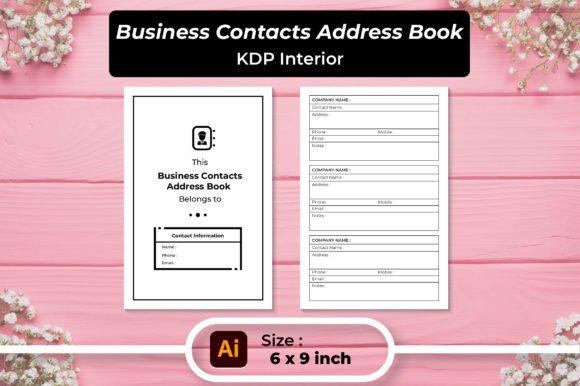
Business Contacts Address Book KDP
Scattered sticky notes, a phone contact list filled with cryptic abbreviations, and a drawer overflowing with half-remembered business cards — professional relationship management rarely gets the attention it deserves. The Business Contacts Address Book KDP brings structure to that chaos. It’s a meticulously designed interior template that turns a blank notebook into a reliable command center for every name, number, and detail that keeps your work moving forward. Whether you plan to publish your own contact organizer on Amazon KDP or just need a clean printable tool for personal use, this template bridges the gap between creative flexibility and immediate practicality.
A Practical Foundation for Your Professional Network
At its core, this template is about clarity. The layout uses a carefully spaced table that dedicates columns to the essentials: full name, physical address, phone number, and email address. A dedicated notes column gives you room for context — how you met, the best time to call, a referral source, or specific preferences. It’s a small detail that transforms a static list into a living document. Because the interior is delivered in multiple file formats, including an editable AI source file, vector EPS, SVGs, high-resolution PNGs, and ready-to-print JPGs and PDFs, you never feel locked into a single workflow. The included 120‑page and 100‑page PDF versions mean you can instantly have a print‑ready book in the popular 6×9‑inch size, with 300 DPI clarity that holds up whether you’re printing at home or through KDP’s professional quality standards.
Creative Paths for Different Publishers and Creators
One of the most exciting aspects of a Business Contacts Address Book KDP interior is how easily it bends to different creative goals. While it’s obvious to publish a straightforward address book for entrepreneurs, the real magic happens when you adapt the template for niche audiences. Imagine designing a version specifically for real estate agents who need a dedicated spot for client staging notes, property addresses, and preferred title companies. A wedding planner might add a column for vendor specialty and confirmation dates. A freelance graphic designer could redesign the header with a minimalist brand pattern and offer it as a coordinated set with their invoice template. Because the source files are editable, you can adjust column widths, swap out table styles, and even add subtle background watermarks that reflect your visual identity — all without starting from scratch.
The flexibility extends beyond print. You can export a fillable PDF version and let customers type directly into the fields on their tablet or laptop, creating a hybrid between a printable and a digital planner. Some creators strip the table formatting in the AI file and rebuild a two-column layout that feels like a modern journal, then offer it as a companion to a business coaching program. The point is that the Business Contacts Address Book KDP template functions less like a rigid mold and more like a launchpad for your own branded resource library.
Making the Template Work Harder for Your Brand
If you’re selling on Amazon KDP, appearance is a silent salesperson. Customers browsing for “address book for business contacts” often make split-second decisions based on the interior preview. With the editable vector files, you can tailor every visual cue. Replace placeholder fonts with ones that echo your book’s cover typography. Add subtle divider lines or tinted table headers that match your brand color palette. If your audience leans corporate, crisp, sans-serif headings and generous white space convey efficiency. For a creative small business owner, a hand-drawn icon next to the “notes” section or a slightly imperfect border adds warmth. These tweaks turn a generic organizer into something that feels curated, and that perceived value translates into better reviews and repeat buyers.
Don’t overlook the value of a consistent visual system. When you offer multiple complementary interiors — say, an expense tracker, a client login sheet, and a business contact log — using the same design language (lines, heading styles, paper texture) builds a cohesive brand on your author page. The Business Contacts Address Book KDP interior can become the cornerstone of a wider product line that quietly encourages customers to collect the full set.
Streamlined Workflow from Editable File to Print-Ready Book
Publishing a low-content book on KDP often stalls because getting the interior file exactly right can be daunting. This template removes that friction. The AI and EPS files are set to the correct 6×9 trim size with appropriate margins and bleed already accounted for. You can open the file in Adobe Illustrator or any compatible vector software, make your customizations, and export a print-ready PDF directly. The pre-built 120‑page PDF version gives you a safety net — you can upload it as-is, knowing it passes KDP’s print requirements. For those who prefer working in raster formats, the high‑quality JPG and PNG files let you rearrange pages in software like Canva or Photoshop. The scalable SVG files are a bonus for creators who want to maintain crisp lines while resizing for a different trim size, such as 7×10 or 8.5×11 inches, though the original is optimized for the handheld convenience of 6×9.
Who Benefits from an Organized Contact Hub?
It’s tempting to think of a business contact book as a dusty relic when smartphones exist, but the people who rely on this tool know that digital address books have limits. A physical or fillable printable log serves a different purpose. It forces intentionality. A small business owner handing the book to a new team member can say, “These are our key contacts — please keep this updated.” A freelance photographer can quickly jot a client’s mailing address at a shoot without fumbling through apps. A life coach leading a retreat can give each participant a copy of a slim contact journal, already branded with the retreat’s logo, as a takeaway for future networking.
Here are a few professions that can adapt the template quickly:
- Virtual assistants who manage multiple client lists and need a dedicated, non-digital backup.
- Event planners tracking vendor contacts, venue managers, and catering leads side by side.
- Independent consultants who prefer recording personal details (kid’s names, coffee order, follow‑up reminders) in a tactile format.
- Sales representatives maintaining a physical territory log that won’t crash during a presentation.
- Creative agencies using a customized version as a premium client onboarding gift.
Each group interacts with the template differently, and because the source files are fully editable, you can craft multiple variants from the same base — a paper‑saving 2‑columns‑per‑page version for the budget‑conscious user, a portrait‑style journal for the writerly type, or a landscape‑oriented workbook for someone who thrives on wide margins and brainstorming space.
Keeping Your Contact List Useful Over Time
An address book is only as good as the effort you pour into maintaining it. When you use the Business Contacts Address Book KDP interior, a few simple practices keep chaos from creeping back. First, assign a purpose to each section. If you’re publishing a 120‑page book for general business contacts, leave the first few pages for an index or a key; an editable file lets you add alphabetized tabs in the margin. Second, embrace the notes column as a relationship journal. Instead of just “Met at conference,” write “Interested in our Q3 webinar series — follow up in August.” That small shift transforms the book from a directory into a lightweight CRM.
Consistency in data entry also matters. If you customize the table headers, make sure the label language (e.g., “Mobile” vs. “Cell”) matches how you actually think about that field. This sounds trivial, but when you’re flipping through pages quickly, a uniform layout cuts mental load. For those selling the book, consider adding a brief “How to Use This Address Book” page right after the title page, with a few sample entries and tips. It elevates the customer’s experience and reduces the likelihood of returns because someone finds the layout confusing.
Staying True to Your Audience Without Sacrificing Simplicity
There’s a quiet beauty in a design that knows exactly who it serves and doesn’t try to do everything. The Business Contacts Address Book KDP template is fundamentally about delivering a clean, repeatable structure that anyone can make their own. Resist the urge to overcomplicate it. Adding too many columns, excessive decorative elements, or tiny fonts may squeeze in more information but quickly makes the book feel cramped and unusable. Instead, play to the template’s strengths: generous spacing, legible table lines, and a rhythm that invites you to write. Whether you’re publishing a no‑frills version for engineers who value precision or a softly styled edition for creative entrepreneurs, let the functionality lead. The editable formats give you the power to adapt without losing the clarity that makes a contact list genuinely helpful.
Finally, think beyond the static book. The included PNG and JPG files let you extract a single page, turn it into a digital download for your website, or use it as a printable opt‑in incentive for email marketing. A real‑estate broker could give away a “Client Contact Quick Sheet” that prints on cardstock and slips into a welcome packet. A podcast host might embed a simplified version in a media kit. The cross‑format flexibility means the same design investment multiplies across your entire brand ecosystem. That’s the kind of efficient creativity that keeps small business owners and content creators coming back to well‑designed KDP interiors time and again.