The Weekly To-Do List: A Smarter Framework for Intentional Planning
For anyone who has ever faced a Monday morning with a vague sense of dread and a scattered mental list of tasks, the weekly to-do list offers a way out. Unlike the daily list that can quickly become a frantic catalog of fires to put out, a weekly perspective encourages you to step back, prioritize, and design your days around what truly matters. When that list lives inside a thoughtfully designed physical planner—rather than another app or scrap of paper—it becomes a tool that shapes your focus, reduces overwhelm, and helps you move through the week with clarity.
I discovered the real power of a weekly to‑do list when I started creating my own bound planners a few years ago. As a freelance project manager, I needed a layout that could hold both client deadlines and personal commitments, but nothing off the shelf felt right. That’s when I started experimenting with printable templates. What began as a personal project quickly turned into a small stationery line, and I learned firsthand that a well-structured Weekly To-Do List template is the cornerstone of any successful print planner. If you’ve ever considered designing your own productivity book—whether for personal use or to sell on a platform like Amazon KDP—the foundation you choose makes all the difference.
Why a Weekly To-Do List Outperforms Daily Scrambling
A daily to-do list can feel satisfying, but it often lacks context. You might tick off six low-value tasks while the most important project sits untouched. A weekly to-do list solves this by giving you a wider lens. When you plan on Sunday or Monday morning, you can see the entire arc of the week: heavy meeting days, windows for deep work, and the moments you’ll need to recharge. This macro view helps you assign tasks realistically, preventing the all-too-common trap of overcommitting on Tuesday and under-delivering by Thursday.
Experience shows that a strong weekly planning practice reduces decision fatigue. Instead of waking up each day asking “What should I do?,” you consult a pre‑written guide you trust. The list becomes a contract with yourself. For best results, structure that list into clear categories: must‑do, nice‑to‑do, and if‑time‑permits. Some planners also include space for weekly goals, habit tracking, and a brief review. When you can customize each section to match your workflow, the weekly to‑do list evolves from a simple inventory of chores into a strategic productivity dashboard.
From Concept to Page: Designing Your Own Weekly Planner Book
Creating a printed planner that others will actually use requires more than a solid idea. You need a clean, professional layout that considers binding, paper size, and printing specifications. This is where a purpose‑built Weekly To-Do List template becomes invaluable. Instead of starting with a blank canvas and struggling with margins, you get a ready‑made structure that you can adapt to your audience’s needs. The right template serves as a blueprint—saving hours of trial and error while ensuring your final product looks polished enough to compete with established planner brands.
Size Matters: Choosing the Right Dimensions for Your Audience
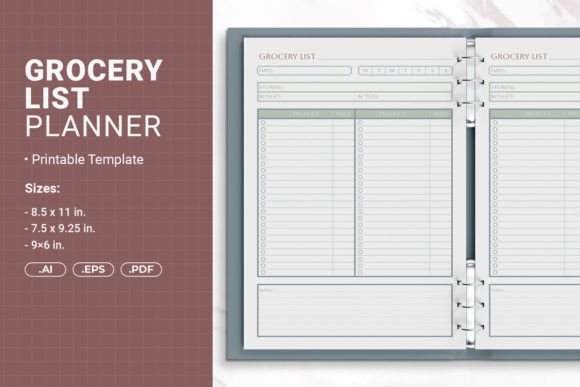
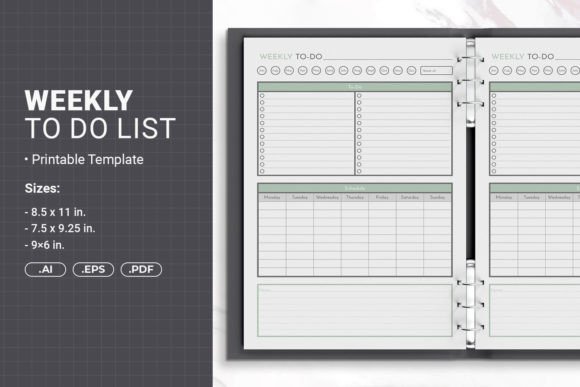
One of the first decisions you’ll face is trim size, which directly influences how your planner is used. A versatile weekly to-do list template should give you options. After watching customers interact with different formats, I’ve found that the ideal size depends entirely on lifestyle:
- 8.5 × 11 inches (Letter) — The classic desktop format. Plenty of writing room makes it perfect for professionals who plan at a desk and want to see an entire week at a glance without flipping pages. This size also doubles as a binder insert when printed with a safe margin for hole punching.
- 7.5 × 9.25 inches (Mid‑Size) — A sweet spot between generous layout and portability. It’s large enough for detailed task breakdowns yet fits comfortably in most bags. Many self‑publishers find this size ideal for softcover planners sold on Amazon.
- 6 × 9 inches (Compact) — The take‑anywhere journal. This size travels well, fits in a back pocket or small purse, and appeals to students, minimalists, and anyone who wants a lightweight weekly companion. Despite the smaller footprint, a well‑designed template still offers ample room for daily task lists.
Having all three sizes available in one template package means you can test which format resonates with your readers, or even offer the same planner in multiple dimensions without redesigning from scratch.
Print‑Ready Files and Bleed: What Self‑Publishers Need to Know
If you plan to sell your weekly to-do list book through a print‑on‑demand service, you can’t skip the technical details. The template must be set up with proper bleed—the extra area beyond the final trim that ensures artwork runs cleanly to the edge. Without it, you risk unsightly white slivers on the finished product. A quality template arrives already configured for Amazon KDP PDF with bleed, so you won’t have to puzzle over slug area settings or resubmit files after a review rejection.
Another often‑overlooked detail is binding. Many creators design a planner that looks flawless on screen but becomes unusable once holes are punched for a three‑ring or discbound system. The right template includes a safe margin for hole punching binding. This simple feature keeps your essential content well away from where the holes will land, so no task or header gets sliced in half. It’s a small thing that dramatically improves the end‑user experience and reduces returns.
Who Benefits Most from a Custom Weekly To-Do List Book?
While anyone can benefit from a structured planning routine, a purpose‑designed weekly to-do list template acts as a launchpad for several specific groups:
- Self‑publishing authors and side‑hustlers who want to create a low‑content book to sell on Amazon. A planner that already meets KDP specifications lets you bypass the steep learning curve of print file preparation.
- Life coaches, consultants, and project managers looking for a branded tool to share with clients. A customized weekly task list reinforces your methodology and keeps everyone aligned.
- Stationery shop owners who want to expand their product line quickly. With an editable template, you can swap colors, add your logo, and have a market‑ready product in hours.
- Busy professionals and students who simply want a planner that fits their unique rhythms. Maybe you need a Monday‑start layout with a separate “personal” column; with source files, that customization is yours.
Editable Files: The Creative Control You Deserve
The true potential of a weekly to-do list template lies in its editability. A static PDF is helpful, but being able to open a vector file and make granular changes transforms a good idea into a truly personal planner. The best template packages include multiple file formats for maximum flexibility:
- AI (Adobe Illustrator) Files — These source files give you complete control over every element. Adjust typography, move sections, or introduce new design elements while maintaining a professionally structured foundation. Even if you’re not an expert, opening an AI file and making small color tweaks is straightforward.
- EPS Files — An open standard compatible with a wide range of design software, including CorelDRAW and Affinity Designer. EPS files ensure you’re not locked into one ecosystem.
- PDF Files — Ready‑to‑print documents that you can send directly to your home printer or upload to a POD platform without any additional work. This is the no‑fuss option when you just want a high‑quality print right away.
Having these formats means you can start with a ready‑made layout and then dial in your brand’s voice: choose fonts that feel like you, introduce a motivational quote at the top of each week, or add a checkbox-style habit tracker. The result is a weekly to-do list that doesn’t look like a generic download but a bespoke product created with intention.
Customizing Without Compromising Professional Quality
One fear I hear often is that personal tweaks will ruin the professional finish. In reality, starting from a well‑constructed template means the underlying grid, margins, and alignment are already taken care of. Your changes sit on top of a solid framework. I’ve watched first‑time designers add their own watercolor backgrounds, corporate logos, or seasonal icons while the list structure remained flawless. A few thoughtful changes can elevate an already useful weekly planning tool into a gift‑worthy item or a top‑selling KDP product.
Beyond the Template: Practical Considerations Before You Print
Even with a perfect weekly to-do list template file, the journey from screen to a physical book has a few more steps. Paper choice matters tremendously for planners—I recommend 70‑lb or 80‑lb bright white paper for a crisp look and minimal ghosting. Next, think about binding. If you’re using that safe margin for hole punching, you can easily pop the pages into a standard three‑ring binder or have them spiral‑bound at a local print shop. Coil binding allows the planner to lie flat, which is essential for daily use.
Always print a proof copy before committing to a full run. What looks perfectly readable on a screen might feel cramped on 6×9 paper, or the font you loved might be too faint. Testing helps you catch these details early. The good news is that a template that’s already PDF‑ready for Amazon KDP means you can order a proof through the platform itself and see exactly how your weekly to-do list will appear to customers.
It’s also worth acknowledging when a print template might not be the right fit. If your audience primarily uses digital tools like Notion or Todoist, a printable weekly planner won’t meet their needs. Likewise, if you want to sell a planner that refreshes dynamically each year with new dates, you’d need a digitized approach. But for anyone who loves the tactile satisfaction of pen on paper—and the explosive growth of the planner community suggests that’s millions of people—a well-crafted physical weekly list remains irreplaceable.
Making the Most of Your Weekly To-Do List System
A beautifully designed template is just the beginning. The real transformation happens when you adopt a consistent planning ritual. Here’s a process that works for many of my customers:
- Sunday evening review. Look back at the previous week. What moved forward? What blocked you? Use that insight to set three “big rock” priorities for the coming week.
- Brain dump into categories. On your weekly to-do list, separate tasks by work, personal, and health. Some templates include dedicated columns for this; if yours doesn’t, you can easily add them using the editable AI file.
- Assign days intentionally. Distribute tasks across the week based on energy levels and scheduled commitments. Don’t fall into the trap of assigning everything to Monday.
- Build in a Friday wind‑down. Reserve 15 minutes to note finishes and capture loose ends for next week. This closes the loop and keeps your system clean.
By pairing a flexible, professionally prepared template with a sustainable weekly practice, you turn the simple weekly to-do list into a centerpiece of personal productivity. Whether you’re designing a product to sell or crafting a tool for your own desk, the foundation you choose will either support your habits or quietly undermine them. Investing in a template that respects both design and real‑world use is the quiet decision that shapes every productive week you’ll ever have.